
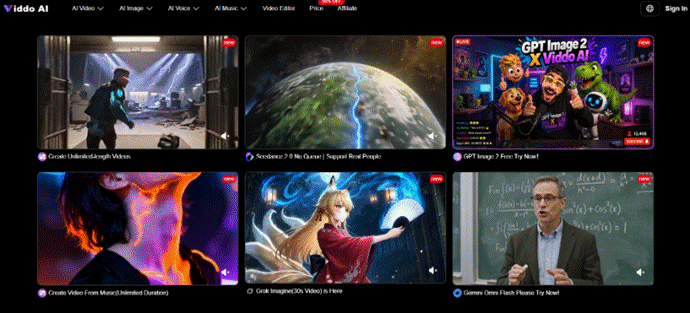
Paragraphs can be accurate and still fail as clips. The text says a program exists. The video shows a building, a crowd, and a result the brief never proved. Readers treat those extra seconds as reporting. That is why text to video ai only helps a web desk when the claim is locked before anyone pastes a script into the box.
Web-to-society pages live on explanations: how a process works, what a policy changes, why a digital habit matters. Viddo AI can turn a written prompt, scene description, or full script into a short video with visuals, motion, and music. Speed is real. The editorial risk is that the generator will fill gaps the writer left empty, and those gaps look like facts once they move.
Lock The Civic Claim Before Opening Text To Video
Write one sentence the clip is allowed to make easier to understand. “The explainer shows a person submitting a form on a laptop, with no invented office or logo” is usable. “Make civic tech look inspiring” is not. The second invitation manufactures skyline shots, applause, and dashboards that the article cannot defend.
Keep statutes, dollar figures, and named agencies in the article body. When those details are forced into generated signage, the model has more chances to misspell or invent them. Motion should carry a single action, the brief already named.
Keep Policy Numbers In The Copy
If the piece depends on a date, a fee, or a legal name, that content stays in text. A test protocol on our desk is simple: paste the claim sentence above the script box, generate from that sentence plus one allowed action, then compare the export with the article. If a new building or a second crowd appeared, the script was too empty, not too short on adjectives.
How The Script Box Turns Words Into Motion And Music
Text to Video does not “add a B-roll layer” to a finished edit. It synthesizes a clip from language. You type or paste an idea. The system produces matching visuals, motion, and music together, usually in a few minutes, then you preview and download. That bundled output is the mechanism that matters. Music and camera movement arrive even when the writer never asked for them.
Because those layers arrive together, an over-written prompt creates three problems at once: the wrong room, the wrong pace, and a score that implies triumph. A thin prompt creates the same three problems with more guessing. The middle path is a scene description that names the allowed action and names what must not appear.
That is also why Text to Video is a different job from Image to Video. There is no approval still to constrain the frame. The script is the only parent. If the writer leaves a hole, the model will furnish a city, a crowd, or a result. The desk has to treat empty adjectives as missing evidence, not as creative freedom.
Type A Scene Description, Not A Slogan
A slogan such as “digital inclusion for everyone” is a heading, not a short list. A usable script names a setting the team can defend, one person or one interface action, and a camera distance. You can start from scratch or use assistance in the creation panel. Assistance does not replace the claim sentence. It only helps you phrase the shot after the shot is chosen.
If the article is a how-to, the script should follow the same order as the steps in copy. If the article is a warning, the script should not end in applause. Music that arrives with the generated step will otherwise argue with the headline. Listen once with the volume up, then again with the volume down, and ask whether the picture still matches the paragraph.
Use Official Steps Without Treating Them As The Article
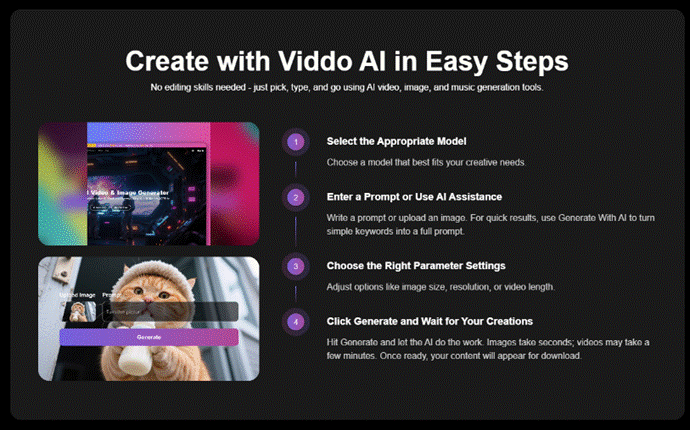
The public path on Viddo AI is four moves: create an account or log in, open the Text to Video panel, type or paste the script, then click Generate. The clip is ready to preview and download after a few minutes, depending on length and complexity. Those steps are enough to start. They are not an editorial policy.
Set ratio from the page module. A desktop explainer embed and a vertical social cut are different jobs. Choose 16:9 or 9:16 from the live crop. Resolution options such as 720p or 1080p should match page weight. Length should match the argument, not the longest menu item. A ninety-word paragraph rarely needs a long wander. If the idea needs more time, write another paragraph first, then decide whether a second clip is justified.
If a first pass fails, change one instruction. Switching the script, the ratio, and the model together makes a “better” result impossible to explain in a meeting. The desk then spends another hour arguing about taste while the original paragraph remains clearer than the clip.
Write a short run note beside each export: claim sentence, script version, ratio, length, Web Search on or off, and seed state if used. Without that note, a failed review becomes a guess. Civic explainers often return weeks later when a form URL changes. The archive should show what readers actually saw, not what someone remembers typing.
Treat Web Search As A Risk Control, Not A Shortcut
The panel can enable Web Search so creations draw on real-time information. For a society explainer, that control is a hazard unless the fact is public, stable, and already in the article. A local process, an unpublished program detail, or a number that changes weekly should not be handed to a search-backed fill. The generator may fetch a plausible image of “a city hall” that is not the city hall in the story.
Turn Web Search Off When The Fact Is Local
If the explainer is about a neighborhood portal, a school form, or a civic app screen, keep searching off and describe only what the writer has seen. Invented architecture fails as soon as it is compared with the reporter’s screenshot. At that point the file is discarded, even if the music feels serious. Local readers will recognize the wrong building faster than a national desk will.
Review Explainers In The Crop Readers Actually See
Preview on the generator is not the article. Drop the export into the real module beside the headline and the first paragraph. Check the first two seconds for a readable action, then the rest for invented props. If a second person or a fake agency seal appears around second three, reject the file. Observable fails to beat “more cinematic.”
When a package has wasted an hour generating extra moods after the claim was already clear, the cost is rework and a delayed publish. Offer two scene descriptions that still obey the same sentence, not ten unrelated cities.
A useful week is three explainers, not thirty moods. Each piece gets a fixed number of generation attempts after the claim sentence is written. When the attempts end, the desk either publishes a cleared clip or keeps the paragraph with a still diagram. Motion remains optional support; the explainer carries the argument.
Keep A Series Consistent Without Changing The Brief
If a week of explainers must feel like one family, lock the seed on the first accepted look and keep it locked while changing only the action in the script. Update the seed when you truly want a new style. Consistency is a delivery requirement for a series, not a novelty. Record the seed state with the script version so a later editor can continue the set without reconstructing a chat.
Commercial use of generated clips is allowed under the site’s usage and licensing terms. A civic desk still has a tighter bar: the clip must not imply an endorsement, a partnership, or a result the article does not state. Licensing is not the same as editorial clearance.
A series also needs a kill list that repeats: no readable fake seals, no named buildings unless the still or the reporter has them, no extra crowd that implies turnout. That list takes a minute and prevents a week of cleanup after three explainers drift in different directions.
Publish Only The File The Sentence Can Defend
Prompts are not the published record. Archive the claim sentence, the script version, and the exact export that passed. Society pages update when a process changes. Without that trio, nobody knows what readers saw the first week.
On the publish sheet, each text to video ai file should stay tied to the sentence it may support. If the sentence changes, the clip returns to review. That habit is slower than dumping every fluent render into the CMS, and it is why corrections stay rare.
Let The Paragraph Stay In Charge
A web-and-society desk should treat Viddo AI as a way to test one visible action around a paragraph the team already stands behind. It cannot decide whether a generated city hall is honest. That decision belongs to the person who owns the explainer.
The practical gate is small: one claim, one allowed action, Web Search off unless the fact is already public in the article, a crop check, and an archived file. Readers forgive ordinary lighting on a laptop scene. They remember the clip that quietly invented a crowd outside a building that was never in the story.
Keep the tool in production after the script is boring enough to defend. Inspiration can wait. The sentence cannot. If a producer wants spectacle, send them back to the article and ask which line the spectacle is allowed to illustrate. If no line exists, there is nothing to generate.